About this Item
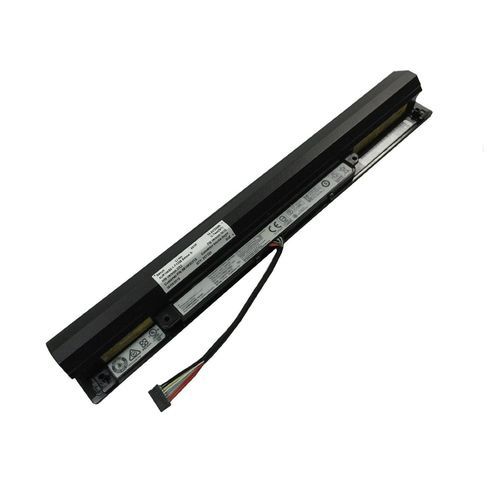
BrandFullyBattery Cell CompositionPolymerUnit Count1 CountVoltage14.4 VoltsAbout this itemBattery Type :Li-ion, Voltage: 14.4V/14.8V,Capacity:32WHFit Part Number:L15L4A01 L15M4A01 L15S4A01High recycle life, high energy density and long life batteryThis IdeaPad V4400 Laptop Battery Compatible original Battery Code:LENOVO45N1182 , 45N1183 , 45N1184 , 45N1185 , 45N1186 , 45N1187 , 4ICR18/65 , 4ICR18/66This IdeaPad V4400 Laptop Battery fit models:LENOVO80EW0194UK, B40, B40 Series, B40-30, B40-30 Series, B40-45, B40-45 Series, B40-70 series, b41-30, B41-80, B50-30, B50-30 (80ES), B50-30 (MCA2VGE), B50-30 (MCA2WGE), B50-30 (MCA32GE), B50-30 (MCA37GE), B50-30 80ES, B50-30 Series, B50-30 Touch, B50-30 Touch Series, B50-45, B50-45 (59445371), B50-45 (MCD23GE), B50-45 (MCD28GE), B50-45 (MCD2GGE), B50-45 (MCD3LGE), B50-45 Series, B50-70It is show clearly this battery can fit my machine model.( Not Necessary ).How to extend a IdeaPad V4400 Series laptops battery working time?While using your laptop, whenever possible, try to use the electricity line as power source:Don’t use unnecessary software. Only use the ones with necessity.Reduce monitor brightness as much as possible.Don’t use unnecessary USB peripherals, such as speaker, keyboard, portable hard drive etc.If unnecessary, don’t use Bluetooth or WiFi.Use Windows Recommended Power Plan. To do so, go to Start>Control Panel>Power Option>(choose) Balanced (Recommended).How to extend a IdeaPad V4400 Series laptops battery life?Always try to keep laptop battery on full charge.High temperature is harmful to the battery, it is a good idea to add a usb cooler for your laptop.Use original ac adapter.Fully charged and discharged the IdeaPad V4400 Series battery at least once a month.Keep the battery in a safe environment, avoid moisture, high temperature and beating.View All Details..