About this Item
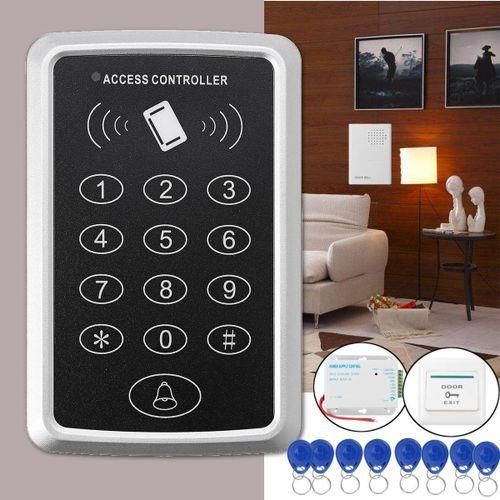
【Specification】Material: Plastic Aluminum alloy: Multi ColorsMagnetic lock bearing weight: 280kgKeyfob distance: Within 3cmDoor Bell Required: 2x AAA Batteries( not included)Exit Button Size: (L)X(W) 86X86mm /3.39 ''X3.39''(appr.)Access Controller Size: (L)X(W)X(H) 115X75X20mm /4.53 ''X2.95'' X0.79"(appr.)Supply Control size: (L) x (W) x (h) 120x95x38mm/4.72 x3.74 X1.5 (appr.)Suitable for: Wooden by, metal by, fireproof by, glass by wrapped edge Supply Control【Features】Input voltage range, small size, high reliability, electronmagnetic compatibility, efficiency, protection function, with remote control to open door, electric lock on the temperature(As compared with the frequency )greatly reduced 【Specification】Input voltage: 110v-240v ACInput Frequency: 50-60HzOutput voltage: 12VOutput Current: 3AOutput voltage trim range: ± 10% ~ ± 15%Load: 1% typicalOutput stability: 0.5% typicalRipple and noise: 1%, peak to peak(100mVpp typical)Insulation voltage:- Junior/sub-polar inter-1500V AC,- primary shell between 1500V AC,- sub-polar/ shell between 500V ACHold Time: Full load typically 20msOperating temperature: -20~ 65℃Overload protection: All outputs in a shourt circuit,overload are protectedoutput of 0-15 seconds delay locksAttention: Then lectronically controlled lock must be transferred to 0 seconds delay,to prevent burning of electric locks Access Controller【Specification】Operating voltage: 12V±10%Operating current: 100mAOperating temperature: 0℃—60℃Storage: 1000usersCard type: EM(standard) /Mifare(optional)Reading distance: 1-5CM Daily use and status tips1. The Daily Use- Swipes the card open: the card is fast approaching the card area of the gate- Password: enter the password, then press #- Card password: swipe first, then enter the password, then press # 2. Status Prompt:- Standby status: slow flash (2 seconds in 2 seconds)- Lock status: the green light is bright- Brush valid card (or valid password) : a short one, green light- Brush invalid card (or invalid password) : short 3 sound, red light slow flash How to reset to Factory Programming Password (123456)Step1, Turn off and connect OPEN and GND terminal. Turn on then there is 3 long beeps with green and red light flashing alternately.Step2, Turn off , disconnect OPEN and GND terminal. Turn on again. Initializing Programming Password is completed.All password can be 3~6 digits. Authentication Mode for Card PIN functionSetp1, When Authentication Mode is [Card or PIN] (factory default), according to the step 3.4 to configure the PIN of the card.Setp2, Press [# Programming Password # 603 #] to configure Authentication Mode to be [Card PIN].Setp3, Swipe user’s card with green light fast flash then input [PIN #] with green light normally ON, the door opened successfully. Door open function description:When the credit card or password is normally opened, press the 7, 9 digit key to keep the door open. When the door is always open, once the credit card, password, or the door button is opened again, the exit is always open. 【Notice】Please allow slight deviation of measurement due to manual measurement.Due to photographic light, product batches, display differences, etc., it may cause unavoidable chromatic aberration problems, please understand. a a a a a a a a a a a a a a a a a a a a a a a a a a a a a a a a a a a a a a a a a a a a a a a a a a a a a a a a a a a a a a a a a a a a a a a a a a a a a a a a a a a a a a a a a a a a a a a a a a a a a a a a a a a a a a a a a a a a a a a a a a a a a a a a a a a a a a a a a a a a a a a a a a a a a a a a a a a a a a a a a a a a a a a a a a a a a a a a a a a a a a a a a a a a a a a a a a a a a a a a a a a a a a a a a a a a a a a a a a a a a a a a a a a a a a a a a a a a a a a a a a a a a a a a a a a a a a a a a a a a a a a a a a a a a a a a a a a a a a a a a a a a a a a a a a a a a a a a a a a a