About this Item
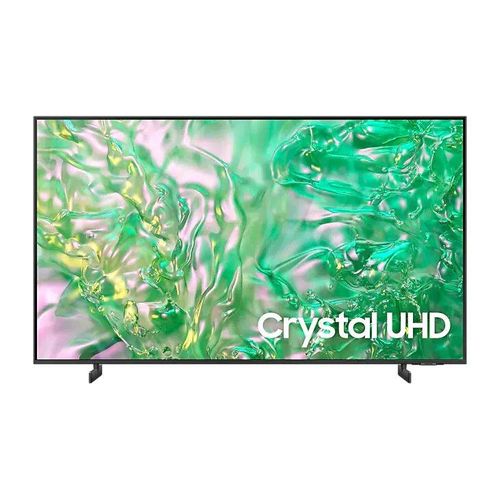
*Global No.1 TV : Worldwide TV Market Share by Manufacturer - Annual unit & revenue basis.*Source - Omdia, Feb 2024. Results are not an endorsement of Samsung. Any reliance on these results is at the third party's own risk. Dynamic Crystal ColourImmerse yourself in one billion shades of colourTake your UHD experience to another level with our advanced phosphor technology. Dynamic Crystal Colour delivers lifelike variations of colours, so you see subtle details of each shade. AirSlim DesignSleek and slimThe mind-blowing slim design of your TV fits harmoniously with its surroundings.Samsung Knox SecurityYour privacy. Secured.Your privacy is now secured on Samsung TVs. Your sensitive data such as pin codes or passwords are protected by multiple layers of software and hardware. Also, Samsung Knox Security secures the home IoT devices connected to your TV and automatically blocks execution of unauthorised malicious apps or access to phishing sites. Lastly, Samsung’s dedicated security team helps keep your TV safe with regular updates.* Secured by Knox’ applies to Samsung TVs powered by Tizen®, launched since 2015.* Security software update is guaranteed for at least three years from product launch.* Latest software update is required. Samsung Tizen OSUpscale your entertainment with Samsung Tizen OSGet more out of your TV with the latest apps & services on Samsung Tizen OS. Enjoy free live TV channels and thousands of movies with Samsung TV Plus, and seamless cloud gaming with Xbox Game Pass*. You can even manage your daily activities with Daily+ and control your smart devices from your TV with SmartThings.* Content and service may vary by region and are subject to change without notice. * Agreement to Smart Hub Terms and Conditions and Privacy Policy is required before use.* Some contents and services require registration and subscription.* Requires Samsung account to access the full range of Samsung Tizen OS features including the smart TV features and apps. If you choose not to login-in, you will only be able to connect to terrestrial TV (applicable to devices with tuners only) and external devices, e.g. via HDMI. You may need a separate device (e.g. PC or mobile) to create a Samsung Account. 4K UpscalingWatch your favourite content in near 4KPowerful 4K upscaling ensures you get up to near 4K resolution for the content you love. Picture quality Crystal Processor 4KFeel every colour as it was intended in powerful 4KCrystal Processor 4K lets the true colours of shows and movies shine with powerful upscaling technology, so you get up to 4K resolution for the content you love.* Viewing experience may vary according to types of content and format.* Upscaling may not apply to PC connection and Game Mode.Contrast EnhancerEnhanced sense of depth and colourContrast Enhancer dynamically adjusts your screen's contrast, resulting in an enhanced sense of depth and colour when you watch content.HDR (High Dynamic Range)Better contrast with rich darks and bright lightsHigh Dynamic Range increases the ratio between the lightest and the darkest regions in a scene, so you can enjoy an enormous spectrum of colours and visual detail, in both bright and dark scenes. Gaming experienceMotion XceleratorExperience improved picture clarity with smooth motionsExperience a clear picture as Motion Xcelerator automatically estimates and predicts the movement between frames to improve the smoothness of your screen's motion.*85" supports Motion Xcelerator 120Hz. Viewing experience may vary according to types of content and format. SoundQ-SymphonyTV and soundbar orchestrated in perfect harmonySurround yourself with sound from your TV and Soundbar orchestrated in harmony. Q-Symphony technology allows TV and soundbar speakers to operate simultaneously for a better surround sound effect, without muting the TV speakers.* Check for Q-Symphony compatibility on soundbar product specifications.* Soundbar sold separately. SmartThings3D Map ViewYour TV as the control centre of your home and IoT devicesBetter manage your home by intuitively monitoring and controlling your home appliances and IoT devices from a 3D map of your house. Easily view and get notifications on the status of your smart devices on your TV screen.* Image is simulated and for illustration purposes only. UI is subject to change without prior notice. Samsung Daily+ Daily Management for your favourite activitiesEasily manage your daily activities from your TV. Access apps and services such as Workspace where you can work from the big screen by connecting your compatible PC, mobile, or laptop and the Workout Tracker where you can get fit with your real-time exercise data on screen during your home workout.** Workspace is compatible with certain PC and mobile devices. Easy Connection app requires Windows 10 OS. Requires compatible keyboard, mouse, and Samsung account. Workout Tracker available from March 2024 on Galaxy Watch 4. Requires Samsung account. SmartThingsDo the SmartThings!Optimise your home devices into a smart lifestyle tailored to your needs. Enhanced with our built-in SmartThings hub, you can enjoy a customised smart home with various SmartThings-compatible devices that simplify your day-to-day.* Available technology, functions and features may vary by country, service provider, network environment or product, and are subject to change without notice.* Requires a Wi-Fi, Bluetooth or other wireless network connection and login to Samsung account.* Connected devices are sold separately.* Use of calm technology requires agreement to both SmartThings' and the auto registered device's privacy notices.* UI is subject to change without prior notice. Workspace Work and learn from homeAccess your PC, laptop and mobile devices easily and seamlessly on your screen. Now you can work and study straight from your TV.* Compatible with certain PC and mobile devices.* Easy Connection application is available on PCs running Windows 10 OS and above. Samsung DeX is supported on selected Galaxy, Note, and Tab devices.* Most functions of Workspace can be used by connecting the keyboard and mouse to the TV.* Requires Samsung account.Multiple Voice AssistantsChoose the voice assistant you're used toPick Bixby or Amazon Alexa to be the voice assistant you use to control your TV. For the first time, both are built into your Samsung TV to provide advanced control for your connected home and for an enhanced entertainment experience.* Samsung may at any time and in its sole discretion without prior warning or notice change the voice assistant services or suspend and/or cease providing the voice assistant services or any part of the voice assistant services. Content, TV services and capabilities pictured may not be available in all regions and territories. Requires Samsung account.* Bixby voice commands recognize English (US/UK), French, Spanish, German, Italian, Chinese and Korean. Not all accents, dialects and expressions recognized.* Amazon, Alexa and all related logos are trademarks of Amazon.com, Inc. or its affiliates. Secure & Sustainable AI Energy ModeSaves energy with intelligent analysisSamsung AI Energy Mode* enables your TV to auto-detect the light level of your room and the on screen TV content to subtly adjust the brightness to only what is needed for a great picture quality while reducing energy consumption.* Energy saving rate may vary by regions, models, sizes, viewing conditions or types of content.* Products shipped in Eco Mode have some AI Energy Mode functions enabled by default, so energy saving levels by turning on AI Energy Mode may appear lower compared to Standard Mode.* AI Energy Mode does not work with Game Mode.* Energy savings based on internal test results and may vary depending on content being displayed and surrounding brightness levels.SolarCell RemoteA remote charged by sunlight and indoor lightsWith a solar panel on its back for charging, you no longer need disposable batteries to control your TV. Simply place the remote face down with the solar panel exposed to either indoor lighting or natural sunlight, and your remote with stay charged.* To charge the remote with solar energy, set the TV remote down with the solar panel facing up. Place it in your living room while your lights are turned on, or you can place it near a window where it will soak in natural sunlight.* In case the remote's battery is depleted, you can charge it using a USB-C cable. To check the remaining battery level of the remote control, refer to the TV Menu (Settings > General & Privacy > Power & Energy Saving > Available Remote Battery).* The design and button layout of the SolarCell remote may vary depending on the region.* SolarCell Remote in 2024 TV models contains a minimum of 24% recycled plastic (based on weight of total plastic)