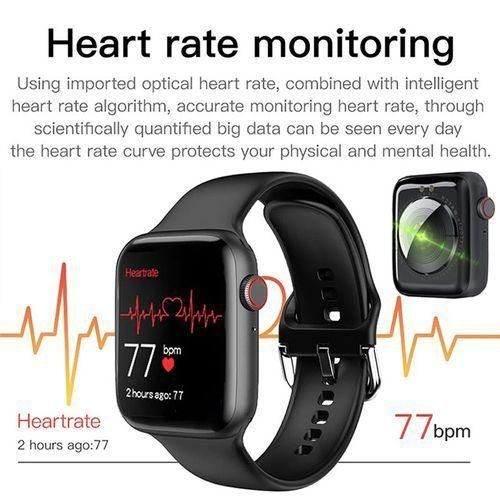
Smart Watch Full Touch Watch - For Android & IOS.
| Store Name | Venus General Store |
|---|---|
| Product Code | DTY49852 |
| Delivery Time (Min) | Less than 24hrs |
| Delivery Time (Max) | 3 days |
| Shipping Fees | Approximately UGX 7,800 |
| Minimum Items | 1 items /order |
Payment Methods
| Store Name | Venus General Store |
|---|---|
| Product Code | DTY49852 |
| Delivery Time (Min) | Less than 24hrs |
| Delivery Time (Max) | 3 days |
| Shipping Fees | Approximately UGX 7,800 |
| Minimum Items | 1 items /order |
Payment Methods

When you order today
Deliver to your Door step.| Ships from | Dantty.com |
| Sold By | Dantty.com |
| Packaging | Select on checkout |
Venus General Store
A genuine super mart that you can trust with quality and affordability
Uganda
Product details How to use?When you use it for the first time, you need to connect to the APP for calibration. After successful connection, the bracelet will automatically synchronize the time, then open your phone and download the APP on your phone. scan the QR code on the manual and scan the code directly to download Connect APP first open the Bluetooth of your phone, then open the cell phone APP:.Bluetooth to find the bracelet, click connect, APP shows that the device is connected successfully.APP scan the QR code on the watch to connect (can't connect: close the bracelet and restart).Mobile phone please make sure to grant all permissions for APP background operation and reading device information during installation or in the cell phone system, so that the watch can always be synchronized with the cell phone.In the off state, press and hold the function key for more than 3 seconds to turn on the watch, and touch/press the function key to light up the screen at any time.After restarting the watch, all the data in the watch will be cleared (such as step count), and the data will be kept in the APP.The default watch UI of the bracelet, touch/press the function key to view different UI, you can also upload photos to make your own UI.Refer to the user manual and configure personal information to find more functions.Note: Due to long shipping, your watch may have run out of battery by the time it arrives. Please charge it for 2 hours before first use. Plug the metal end into the USB charger. Once charging begins, the battery icon will not appear immediately. Please charge for 10 minutes or more and tap the screen to check the charging status. If the charging icon still does not appear, please check if the electrical contacts are firmly connected.Smartwatches are devices that measure human activity through electronic sensors. They are at the level of consumer electronics. It is normal for some deviations to occur. Please treat these data objectively. The data cannot be used as a clinical device reference.Do not expose the smartwatch to high humidity and high temperature for a long time. The watch only supports life waterproof, please do not wear it while swimming.
| Product Name | Smart Watch Full Touch Watch - For Android & IOS. |
| Brand | Generic |
| Weight | 1 Kg |
| Package Content | |
| Warrant | 0 |
| Color | |
| Keywords |
No questions yet. Be the first to ask a question!
The price of Smart Watch Full Touch Watch - For Android & IOS. in Uganda is UGX 40,000.
To calculate the overall star rating and percentage breakdown by star, we don’t use a simple average. Instead, our system considers things like how recent a review is and if the reviewer bought the item on Dantty. It also analyzes reviews to verify trustworthiness.
Share your thoughts with other customers
Write a customer reviewNo reviews yet. Be the first to leave a review!